Gameplay Programmer

I'm Olle. I build gameplay systems across Unreal Engine 5 (C++ and Blueprint), Unity (C#), and Raylib.

Portrait of Olle
FocusUnity · C# · Gameplay
Also usingUE5 · C++ · Blueprint · Raylib
Based inStockholm, Sweden
See the projects GitHub Get in touch
Scroll
Projects
01 / 06 Group project · CourseworkTime: 5 weeks

The Unseen

A group project built in Unreal Engine 5, a psychological horror game. I mainly worked on gameplay programming, building reusable interaction, inventory, puzzle, room-state, and event-driven systems in C++ and Blueprint, and connecting them into the game's interactive gameplay.

Interaction & Puzzles

Built the interaction system that lets players trigger gameplay events, then used it to develop and connect several puzzles, including their logic, states, and completion conditions.

Inventory

Worked on the inventory and item handling, covering picking up, storing, and using items.

Room State System

Created logic for rooms to shift between states, where a state change could affect objects, lighting, audio, and puzzles. This also drove interaction feedback like the radio and switches, so the world responds to what the player does.

Systems & Integration

Used events and delegates so gameplay systems could react to changes without constantly checking for updates, and built core functionality in C++ that's exposed to Blueprint so the rest of the team could use and configure it.

Unreal Engine 5 C++ Blueprint Team project
This is the room-state puzzle manager. Interactive objects call RegisterActivatedObject() as they're triggered, and once enough are active it fires a Blueprint-facing event to unlock the puzzle. A separate ToggleRoomState() broadcasts a state change that other actors (lighting, audio, objects) can bind to and react to.
PuzzleManager.cpp
void APuzzleManager::ToggleRoomState()
{
    bStateB = !bStateB;
    
    GEngine->AddOnScreenDebugMessage(
       -1,
       2.f,
       FColor::Green,
       bStateB ? TEXT("STATE B") : TEXT("STATE A")
   );
    
    OnRoomStateChanged.Broadcast(bStateB);
}

void APuzzleManager::RegisterActivatedObject()
{
    ActivatedObjects++;
    
    GEngine->AddOnScreenDebugMessage(
    -1,
    2.f,
    FColor::Yellow,
    FString::Printf(TEXT("%d / %d"),
    ActivatedObjects,
    RequiredObjects)
);

    if (ActivatedObjects >= RequiredObjects)
    {
       GEngine->AddOnScreenDebugMessage(
          -1,
          2.f,
          FColor::Green,
          TEXT("Puzzle Unlocked!")
       );

       OnPuzzleUnlocked.Broadcast();
    }
}
The Unseen gameplay clip
Watch on YouTube
02 / 06 CourseworkTime: 2 weeks

Curfew

Guard AI for a stealth game built in Unreal Engine 5: patrol routes, perception-driven detection, and squad-wide alerting the moment the player is spotted.

Behaviour

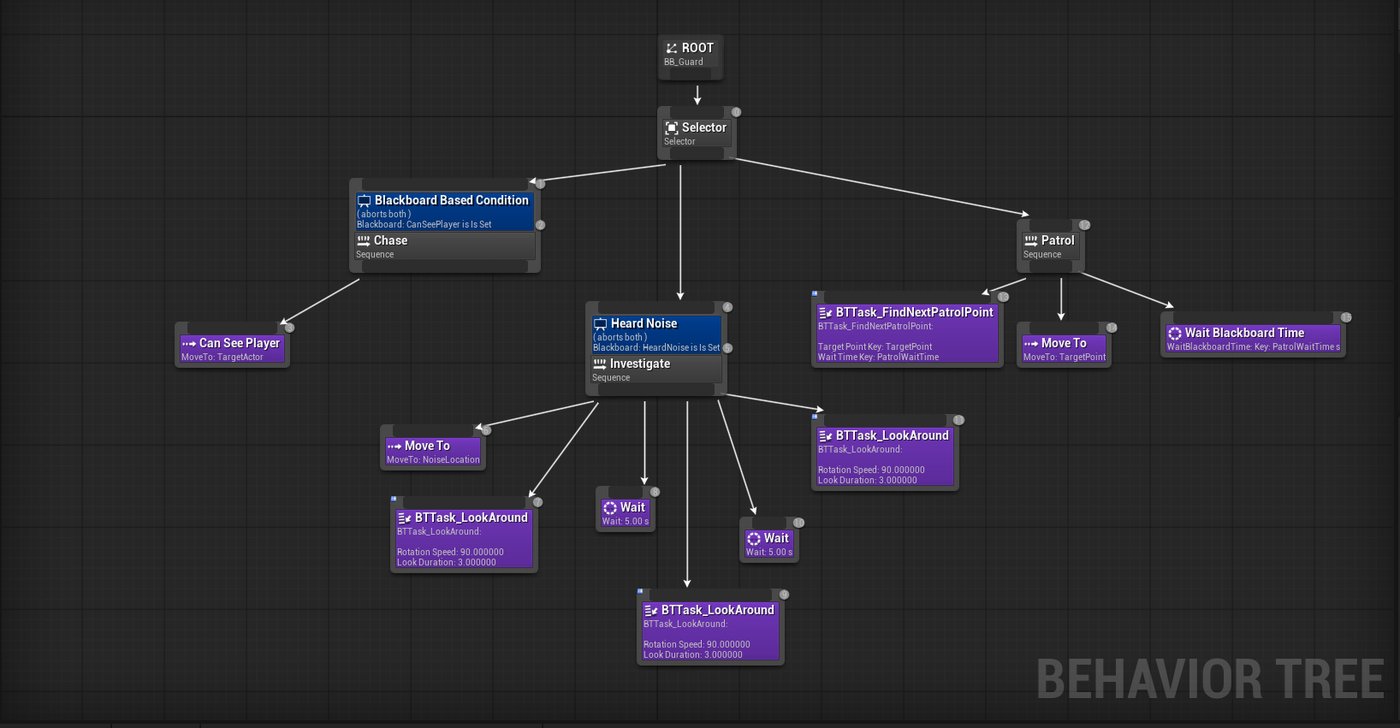
Modeled guard decision-making with a Behaviour Tree spanning Patrol, Investigate, and Chase branches, driven by Blackboard keys tracking target and noise state.

Perception

Built sight- and hearing-based detection with full 360° awareness, so guards react convincingly no matter which way they're facing.

Systems

Coordinated squad response with a custom AlertToPlayer event broadcast to every NPC in the level, so one spotted player triggers a full search.

Unreal Engine 5 Blueprint Behaviour Trees AI Perception
This is the guard's Behaviour Tree. A root Selector checks conditions in priority order: if the guard can see the player it Chases, if it heard a noise it breaks off to Investigate (moving to the sound, then looking around), and otherwise it falls back to its normal Patrol loop of moving between points and waiting.
BT_Guard
Curfew guard Behaviour Tree
Curfew gameplay clip
Watch on YouTube
03 / 06 Group project · CourseworkTime: 5 weeks

USS-Calliope

A group project built in Unity with C#. I focused on the player, building movement, health, stamina, and abilities, and also designed parts of the level.

Player Movement

Built the player character and movement controller, the core of how it feels to move around the world.

Health & Stamina

Implemented the health bar and stamina systems. Stamina regenerates on its own, but HP only recovers from health packs, so the two resources push the player to manage risk differently.

Abilities

Built two player abilities, a cloak and a dash, both fueled by the stamina system, giving the player a tactical trade-off between using resources to move fast or stay hidden.

Level Design

Designed parts of the level alongside the rest of the team.

Unity C# Team project
This is the dash input detection. Rather than binding dash to its own key, it watches regular movement input for a quick double-tap in the same direction, timing how long each tap is held and how soon the next one follows, then spends stamina to trigger the dash.
DashAbility.cs
void HandleMoveInput(Vector2 moveInput)
{
    if (!_isKeyDown && moveInput != Vector2.zero)
    {
        _isKeyDown = true;
        _keyDownTime = Time.time;
        _currentDir = GetCardinalDirection(moveInput);
    }
    else if (_isKeyDown && moveInput == Vector2.zero)
    {
        float held = Time.time - _keyDownTime;
        if (held <= maxTapHoldTime && _currentDir != Vector2.zero)
            RegisterTap(_currentDir);

        _isKeyDown = false;
        _currentDir = Vector2.zero;
    }
}

void RegisterTap(Vector2 dir)
{
    float now = Time.time;
    
    if (Vector2.Dot(dir, _lastTapDir) > 0.99f &&
        now - _lastTapTime <= doubleTapWindow)
    {
        TryStartDash(dir);
    }

    _lastTapDir = dir;
    _lastTapTime = now;
}

void TryStartDash(Vector2 dashDir)
{
    if (_isDashing || _controller == null || _stamina == null)
        return;

    if (_stamina.isTired || _stamina.currentStamina < dashStaminaCost)
        return;

    _stamina.currentStamina -= dashStaminaCost;

    _isDashing = true;
    _controller.IsDashing = true;

    _dashTimer = dashDuration;
    
    float dashSpeed = _controller.moveSpeed * dashSpeedMultiplier;
    _controller.StartDash(dashDir, dashSpeed);
}
USS-Calliope gameplay clip
Watch on YouTube
04 / 06 Solo projectTime: 2 weeks

Mega Guy

A 2D platform shooter inspired by Mega Man, one of my first ever projects.

Enemies

Built patrolling enemies across several different enemy types, each with its own behaviour. Enemies detect when the player is in range, then target and shoot at them.

Level Mechanics

Implemented moving platforms as a core traversal mechanic alongside the platforming and shooting.

Animation

Gave both the player and enemies a full set of animations, idle, run, jump, fall, and shoot variations for the player, and movement-driven animation for enemies, so every state reads clearly.

Unity C# 2D
This is the flying enemy's shooting logic, one of the enemy types in Mega Guy. Each frame it checks the distance to the player, and once in range it fires on a timer, aiming the bullet's velocity straight at the player's position.
FlyingEnemy.cs
void Update()
{
    // Face player regardless of movement
    FacePlayer();

    // Shooting logic
    if (player != null && firePoint != null && bulletPrefab != null)
    {
        float distance = Vector2.Distance(transform.position, player.position);

        if (distance < shootRange)
        {
            shootTimer += Time.deltaTime;
            if (shootTimer >= shootInterval)
            {
                ShootAtPlayer();
                shootTimer = 0f;
            }
        }
        else
        {
            shootTimer = 0f;
        }
    }
}

void ShootAtPlayer()
{
    Vector2 direction = (player.position - firePoint.position).normalized;
    GameObject bullet = Instantiate(bulletPrefab, firePoint.position, Quaternion.identity);
    Rigidbody2D rb = bullet.GetComponent<Rigidbody2D>();
    if (rb != null)
    {
        rb.linearVelocity = direction * bulletSpeed;
    }
}
Mega Guy gameplay clip
Watch on YouTube
05 / 06 Solo projectTime: 3 weeks

Travers Big Christmas Adventure

A solo project built in Unity with C#, a small top-down 2D game I made for my wife. Talk to NPCs to pick up a quest, collect gifts scattered around the world, then deliver them to finish the story.

Quest System

Built a two-phase quest, collect ten gifts, then deliver nine to NPCs, driven by a central QuestManager that tracks progress and unlocks dialogue and the ending as it advances.

NPC Dialogue

Gave NPCs branching dialogue that reacts to quest state, so the same character says something different before, during, and after each phase.

Interaction & Movement

Built proximity-based talk detection, with a wider range for quest givers than regular NPCs, plus four-direction movement and animation for the player.

Ending

Wired up a fade-to-black ending sequence that plays once the last gift is delivered.

Unity C# Solo project
This is the quest giver's dialogue logic. Instead of separate scripts for each stage, one method checks the shared QuestManager's state and shows the right line, whether that's starting the quest, tracking collection progress, opening the delivery phase, or triggering the ending.
QuestGiverNPC.cs
public void Talk()
{
    DialogueManager dm = FindFirstObjectByType<DialogueManager>();
    if (dm == null || QuestManager.Instance == null) return;

    QuestManager qm = QuestManager.Instance;

    // No quest yet - start collect 10
    if (!qm.questActive && !qm.collectPhaseComplete && !qm.deliveryPhaseActive && !qm.questComplete)
    {
        qm.StartQuest();
        dm.ShowDialogue(introText);
    }
    // Collecting 10
    else if (qm.questActive)
    {
        dm.ShowDialogue(string.Format(collectText, qm.CollectedCount, qm.collectRequired));
    }
    // Finished 10, not started delivery yet
    else if (qm.collectPhaseComplete && !qm.deliveryPhaseActive && !qm.questComplete && qm.DeliveredCount == 0)
    {
        qm.StartDeliveryPhase();
        dm.ShowDialogue(phase2Text);
    }
    // All 9 delivered, quest not completed yet - final talk + trigger ending
    else if (!qm.deliveryPhaseActive && !qm.questComplete && qm.DeliveredCount >= qm.deliveryRequired)
    {
        dm.ShowDialogue(finalText);
        qm.CompleteQuest();   // fade + ENDING
    }
    // Delivering 9 (still in progress)
    else if (qm.deliveryPhaseActive)
    {
        int remaining = qm.deliveryRequired - qm.DeliveredCount;
        dm.ShowDialogue(string.Format(deliveryText, remaining, qm.deliveryRequired));
    }
}
Travers Big Christmas Adventure gameplay clip
Watch on YouTube
06 / 06 CourseworkTime: 2 weeks

Donalds Zetaflare Adventure

A solo project built in Raylib and C++, a top-down survival game inspired by Vampire Survivors. Fight through ten escalating waves of enemies, switch between two weapons, and level up as you go.

Weapon Systems

Built two swappable weapons, a spinning melee Fireball and an auto-firing Lightning bullet pool, toggled with Tab and driven by an object-pooled bullet system.

Waves & Enemies

Built a 10-wave spawner with escalating difficulty across Normal, Fast, Tank, and Boss enemy types, plus continuous background spawning and a boss fight that triggers the win condition.

Progression

Implemented an XP and leveling system with a level-up screen that lets the player choose between three upgrades: more max HP, faster lightning, or faster fireball spin.

Ultimate Ability

Built a beam-based ultimate attack with its own cooldown, sampling points along the beam to damage every enemy it passes through.

Raylib C++ Solo project
This is the ultimate ability's damage logic. Since Raylib has no built-in beam collision, I sample 40 points along the beam's length each frame and check each one against every enemy's hitbox, marking enemies as already hit so one beam doesn't deal damage more than once per activation.
Ultimate.cpp
void Update(float deltaTime, Vector2 playerCenter, float angle, EnemyManager& enemyManager) {
    if (isActive) {
        timer += deltaTime;

        float beamLength = 1000.0f;
        float beamHalfWidth = 75.0f;
        int   numSamples = 40;

        // RESET HIT FLAG FOR ALL ENEMIES
        for (auto& e : enemyManager.enemies) {
            e.hitByUltimate = false;
        }

        // SAMPLE POINTS ALONG THE BEAM
        for (int i = 0; i <= numSamples; i++) {
            float t = (float)i / (float)numSamples;
            Vector2 point = {
                playerCenter.x + cosf(angle) * beamLength * t,
                playerCenter.y + sinf(angle) * beamLength * t
            };

            for (auto& e : enemyManager.enemies) {
                if (!e.isDead() && !e.hitByUltimate && CheckCollisionCircleRec(point, beamHalfWidth, e.GetRect())) {
                    e.hp -= 100.0f;
                    if (e.hp < 0) e.hp = 0;
                    e.hitByUltimate = true;
                }
            }
        }

        // ULT STOP
        if (timer >= duration) {
            isActive = false;
            timer = 0.0f;
            cooldownTimer = cooldown;
        }
    }
}
Donalds Zetaflare Adventure gameplay clip
Watch on YouTube
Skills

Tools I build with

Languages

C#C++Blueprint

Engines

UnityUnreal Engine 5Raylib

Gameplay Systems

Behaviour TreesAI PerceptionBlackboards

Tools

JetBrains RiderGit

Let's build something.

Open to game development opportunities, collaborations, and feedback on any of the above. If a system here looks like your kind of problem, get in touch.